Play Breeder stories on iPhone.

Breeder Player imports `.breeder.zip` story packages, previews them, plays them with touch controls, and lets you tune per-page settings without going back to Windows.
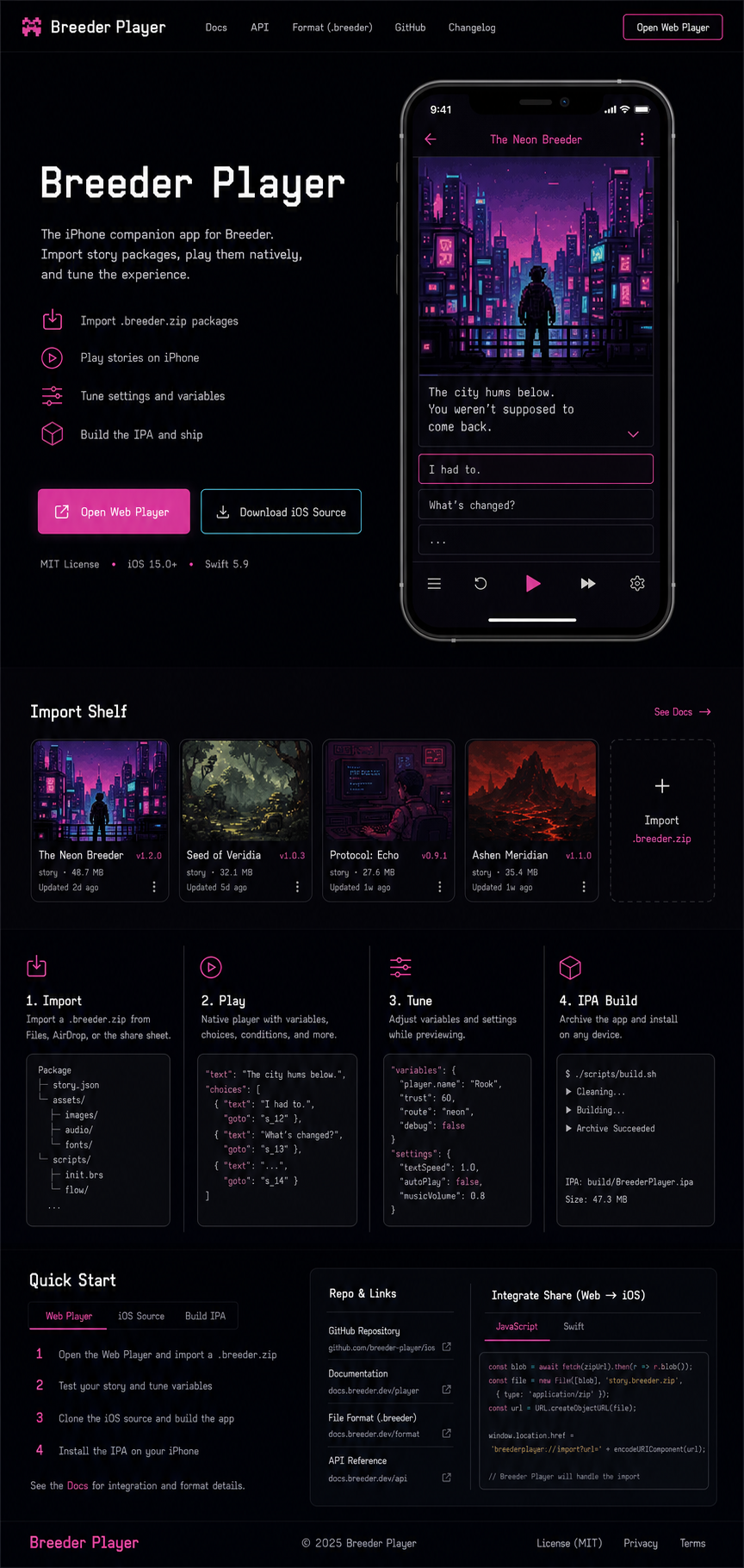
ImportTap Stories, import a `.breeder.zip`, or open a linked story URL.
PlayClicks become taps, drags become swipes, and keyboard-style controls become touch zones.
TuneChange page task, theme, loops, fit, and save a new copy.
Breeder Player phone and import preview

Use It Across Devices

This handoff is built so your other computer is not guessing. Breeder stays the Windows creator, this Cloudflare site carries the player and source package, the Mac signs the iPhone app, and the phone imports the same `.breeder.zip` stories.

Windows creator PC

  1. Create or randomize the Breeder game.
  2. Export the finished story as a `.breeder.zip` package.
  3. Move that file with iCloud Drive, AirDrop, USB, or an HTTPS link.

Cloudflare handoff

  1. Download the iOS source zip from this page.
  2. Open the web player at `/app/` for browser testing.
  3. Use `/app/?story=ENCODED_HTTPS_ZIP_URL` for one-tap linked story imports.

Mac build machine

  1. Unzip `Breeder-iOS-source.zip`.
  2. Open `BreederIOS.xcodeproj` in Xcode.
  3. Set your Apple Team, then build to iPhone or export the signed IPA.

iPhone or iPad

  1. Install the signed Breeder Player app.
  2. Tap Stories, Import, and choose a `.breeder.zip` from Files.
  3. Preview, play, tune page settings, and save tuned copies as new stories.

Import Breeder Files

A Breeder story is the normal game export zip with the `.breeder.zip` filename. Keep the package intact; it contains `game/game.json`, the player, CSS, media files, and platform wrapper notes.

From Windows Breeder

  1. Build or randomize the Breeder game.
  2. Use Export Game.
  3. Move the saved `.breeder.zip` to iCloud Drive, AirDrop, a Cloudflare asset path, or any HTTPS file host.

Inside Breeder Player

  1. Open the web player or the iPhone app.
  2. Tap Stories.
  3. Tap Import and select the `.breeder.zip` from Files.

From a Link

Host the story zip on the same Cloudflare site, or on a HTTPS host that allows CORS. Then append the encoded file URL with `?story=`.

/app/?story=https%3A%2F%2Fexample.com%2Fstory.breeder.zip

Touch Control Parity

The player uses the same Breeder runtime as the Windows preview/export path. The iPhone shell changes the input surface, not the story format.

Windows control

  • Click / double click
  • Mouse hold
  • Pointer drag
  • Keyboard arrows

iPhone control

  • Tap / double tap
  • Press and hold
  • Swipe or drag on the play field
  • On-screen left/right/drop touch zones

Story tuning

  • Page task type
  • Theme and page theme
  • Loop count and fit mode
  • Game, tap, pan, and anime settings

Build the IPA

The included source is ready for Xcode. A valid signed `.ipa` still requires macOS, Xcode, and your Apple signing team; Windows can prepare the source handoff but cannot produce the signed archive.

Fast Mac build

cd BreederIOS APPLE_TEAM_ID=YOURTEAMID ./build_ipa_on_mac.sh

The archive exports to `BreederIOS/build/Breeder.ipa` when signing succeeds.

Xcode path

  1. Open `BreederIOS.xcodeproj`.
  2. Select target `BreederIOS`.
  3. Set Signing & Capabilities Team.
  4. Product, Archive, then export Development or Ad Hoc.

Downloads

The source zip bundles the current Breeder web player, iOS WKWebView wrapper, document handoff, app icons, and build script.

iOS source

Open on a Mac with Xcode to sign and produce the IPA.

Download source

Build note

Short version of the Mac signing and archive commands.

Read build note

Handoff notes

What changed, how imports work, and when to use the in-app importer.

Read handoff